

If you create crypto content — a blog, a YouTube channel, an X profile, or TikTok lives — sooner or later your audience will drop the classic line: "show us your portfolio". And that's a good thing, because transparency in this industry is more valuable than BTC. The problem is that most portfolio trackers were designed for the lonely investor, not for the creator. Here are nine concrete reasons why Sakurato is the right tool for influencers, bloggers, and vloggers — built around transparency, control, and frictionless publishing.
In one sentence: transparency is your currency — your portfolio shouldn't be locked inside an exchange app, it should live where your audience already is.
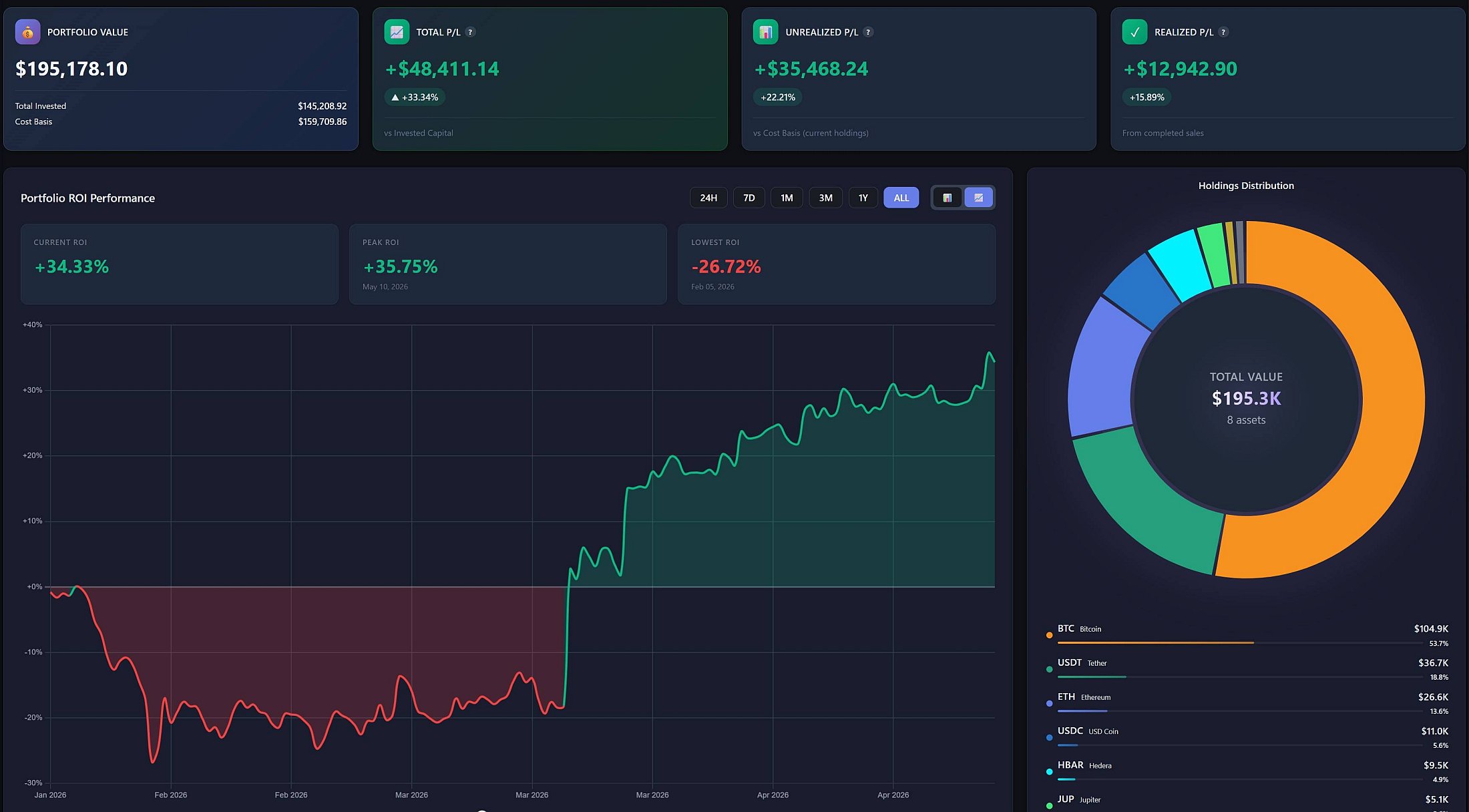
Reason 1
Live shortcodes — your portfolio embedded directly in your content
Most portfolio trackers give you a screenshot or a link to an external dashboard. We give you shortcodes you paste into any post or page:
[sakurato— full holdings table with live prices_crypto_portfolio] [sakurato— portfolio value vs. invested capital chart, with optional P/L Zones_crypto_portfolio_chart] [sakurato— performance cards (24H, 7D, 30D, 60D, 180D, 1Y, ALL) with sparklines_crypto_portfolio_performance] - ROI chart, holdings distribution donut, and several other widgets to choose from
Your viewer lands on your site and sees the current portfolio value — not a week-old screenshot. Prices are pulled in the background from CoinGecko, so it's a real live view, not a static image.
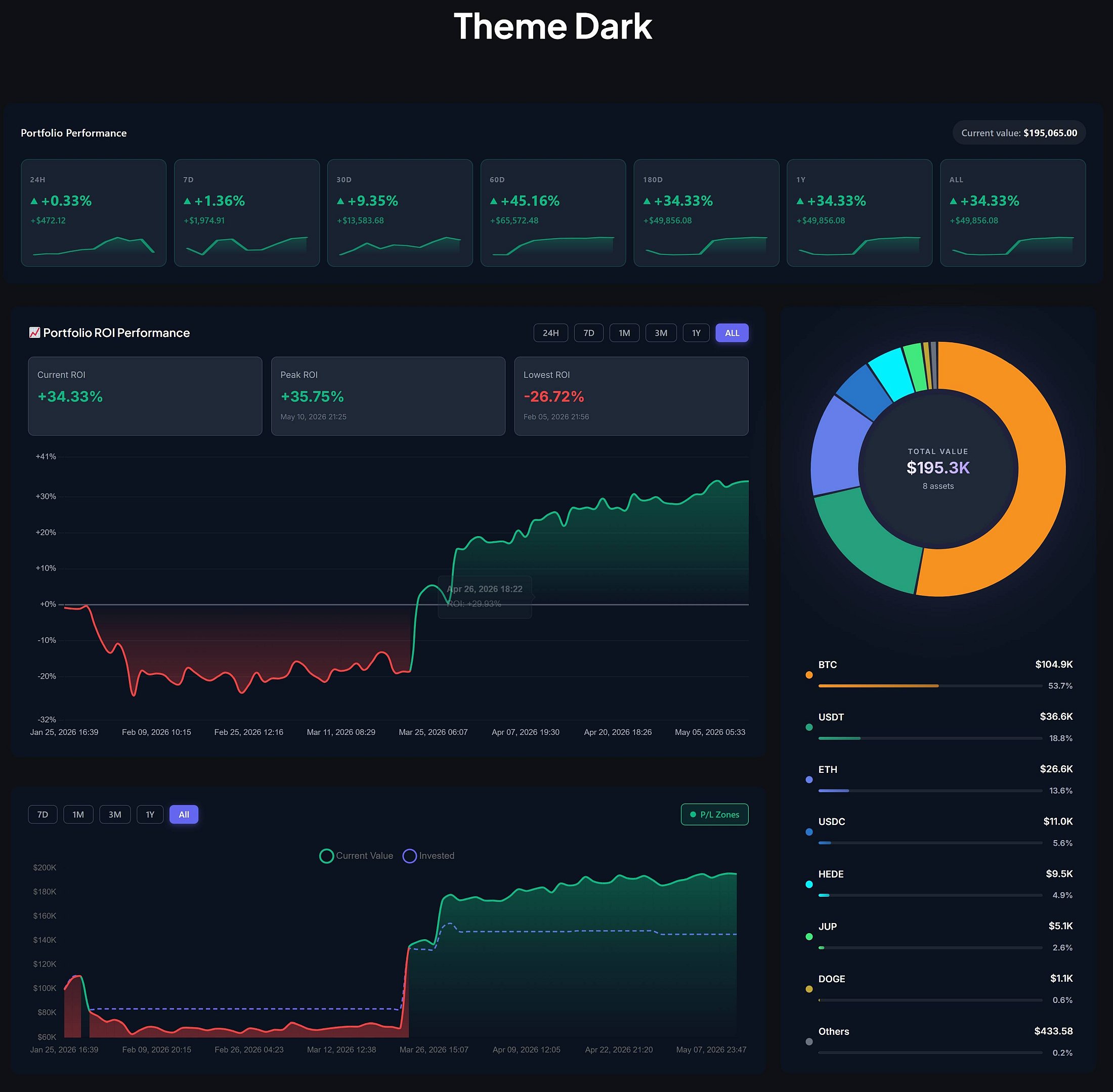
Reason 2
Snapshots + Social Share = ready-to-post content
Sakurato lets you take a portfolio snapshot at any moment — preserving the state of all holdings, prices, and total value at that point in time. That alone is great for archiving your investment decisions. But we also added a Social Share widget with a Download PNG button — generated locally in the browser, no third-party service involved.
In practice: you click, you get a ready image of your portfolio, and you post it to X, Instagram, or use it as a YouTube thumbnail. No Photoshop, no workarounds, no paid screenshot tools.
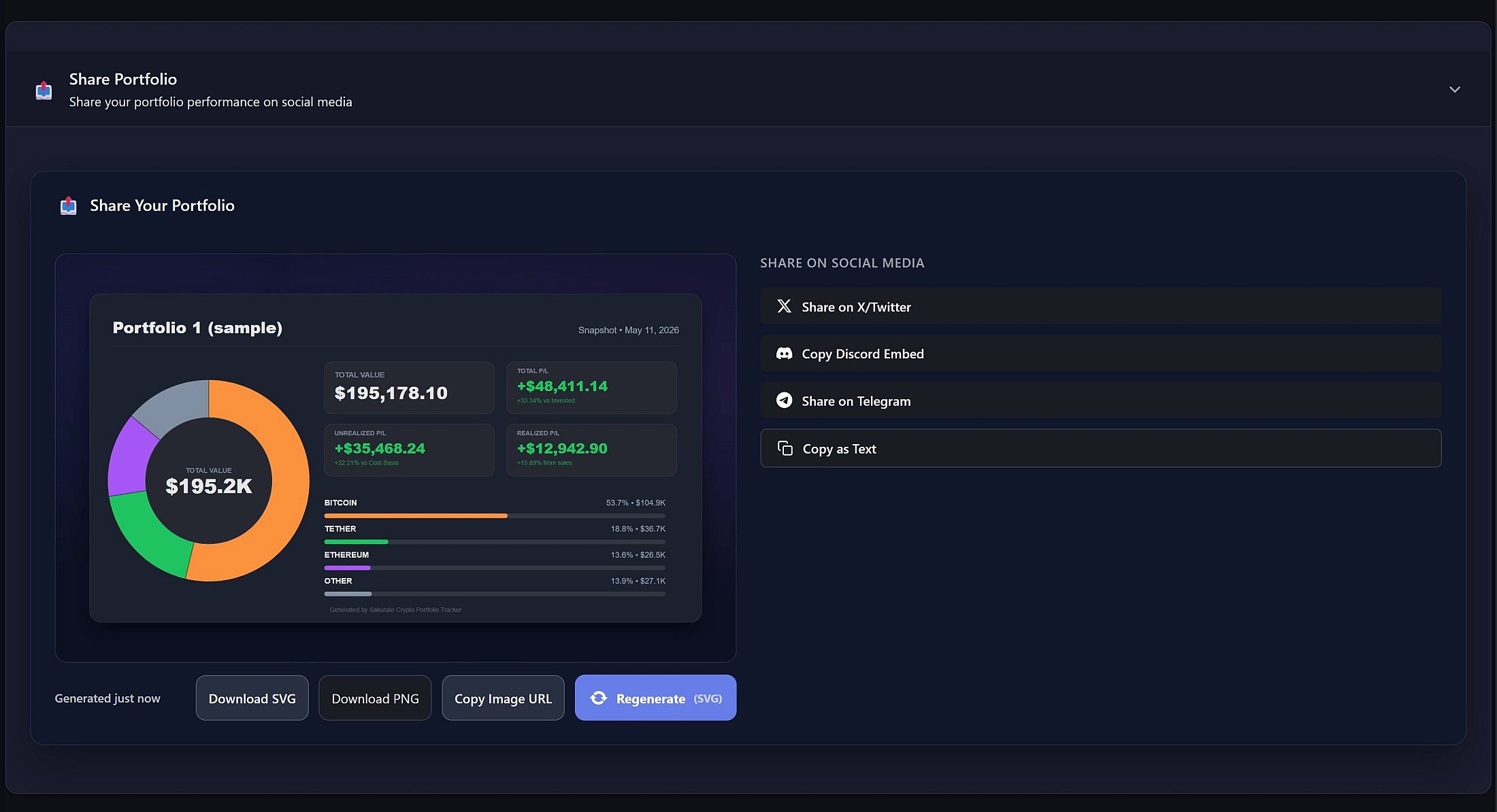
Reason 3
Zero exchange connection = zero risk of exposing your account
Most trackers require you to plug in an API key from Binance, Bybit, or Coinbase. For the average user, that's convenient. For an influencer, it's a serious security risk — even read-only API keys can be abused (e.g. through a tracker provider data breach). And if you misconfigure permissions and accidentally enable withdrawals, you could lose funds.
Sakurato is fully manual. You enter your transactions (buy / sell / withdraw) and that's it. Your wallet, your exchange, your account — nothing in this ecosystem touches the plugin. Perfect if you trade across multiple exchanges and don't want to expose any of them.
Security baseline: if you're a public figure, every connected service is one more attack vector. A tracker that doesn't talk to your exchange at all is structurally safer than the best read-only API key.
Reason 4
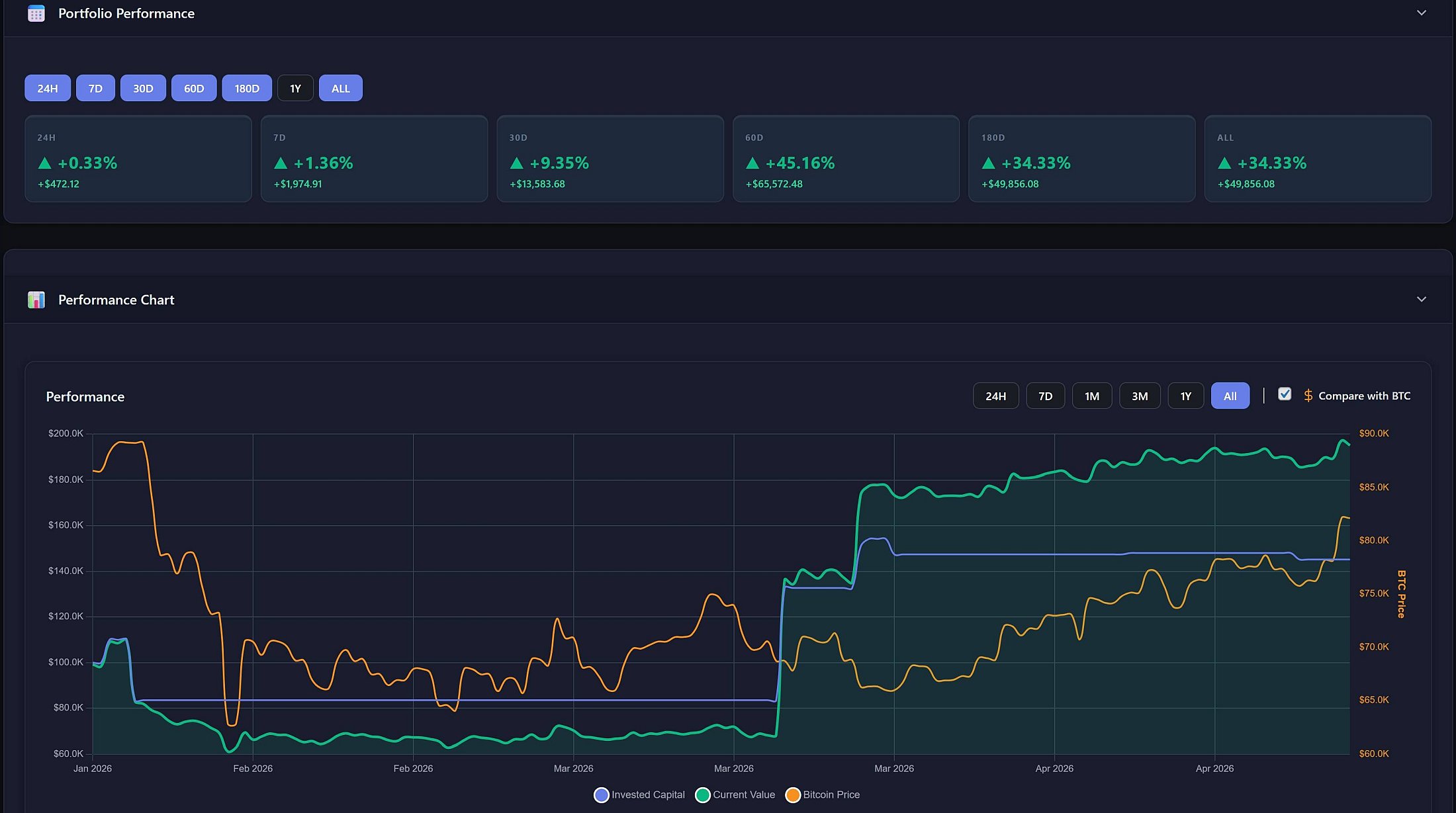
Performance Periods — honest social proof
The dashboard shows portfolio performance across 7 time windows: 24H, 7D, 30D, 60D, 180D, 1Y, and ALL — each with a mini sparkline. As a creator, you've got content material for every format in one place:
- Reels / Shorts: "What my portfolio did in the last 24h"
- A blog post summarizing a month or quarter
- A yearly recap with real ROI — not some rounded-up "I did 5x"
And importantly — these numbers come from your real transactions, so viewers know you're not cooking the stats.
Reason 5
Self-hosted — your data lives on your WordPress
Everything sits in your own database. Chart.js is served locally from the plugin, no CDN. CoinGecko only receives coin identifiers (like bitcoin, ethereum) — no personal data, no telemetry. This matters for two reasons:
- GDPR / privacy — if you run a business in the EU, you stay compliant. The plugin even adds its own block to the WordPress privacy policy through
wp_add_privacy_policy_content() - Independence — if a tracker shuts down, your data goes with it. Yours stays with you as long as you have hosting
Reason 6
Viewers don't need to log in
Classic problem with free trackers: to see someone's portfolio, the viewer needs an account. Or you send them to a third-party site, where half of them bounce off the login wall. Sakurato shows a public portfolio view to anyone who lands on the page with the shortcode — a logged-out visitor sees the same data as you (minus private notes and admin actions).
Less friction = more people actually see your portfolio = more engagement.
Reason 7
Snapshots as an archive of your investment decisions
Are you filming a video about buying more Solana after a local correction? Save a snapshot that same day. Six months later, in retrospect, you have hard evidence that you actually did it — with the exact entry price, quantity, and portfolio value at that moment.
That builds credibility in a way that can't be faked after the fact. A regular screenshot can be doctored — a database entry with a timestamp is much harder to fake.
Reason 8
Your viewers stay on your site instead of bouncing to CoinGecko
This argument is more about your business than your viewer, but it's worth saying: instead of linking your video description to CoinGecko or CMC — where the viewer escapes your funnel — you can link to a page on your blog, where they see the portfolio plus your commentary, plus your ads, plus your sponsors, plus your other content.
That directly translates into better SEO, ad monetization, sales of your own products (courses, ebooks, mentoring), and keeping traffic in your ecosystem.
Reason 9
Free plugin from the official WordPress.org repository
The plugin is completely free, available in the official WordPress.org catalog, no account or API key required. You can recommend it to your audience — anyone can set up their own tracker in under 2 minutes and start their own portfolio journal. For an educational creator that's a real lead magnet: "I'll show you how I track my portfolio — now you do the same".
And if you run multiple portfolios (e.g. spot, alts, DeFi farm) or want the advanced Reports module with tax summary, you can add the Sakurato CPT Pro add-on — but that's optional, not required.
A real lead magnet: "I'll show you how I track my portfolio — and here's the free plugin you can install yourself." That's a value-first call to action your audience will actually click.
How it works in practice — a day in the life of a crypto vlogger
To keep this out of theory land, here's a concrete scenario. Meet John — fictional, but very realistic — a creator who runs a crypto YouTube channel and a WordPress blog:
Monday morning. John opens the WP admin and goes to the Crypto Portfolio tab. He bought some ETH over the weekend after a local correction — he enters the transaction manually (date, amount, price). 30 seconds of work. He clicks "Take a snapshot" — the plugin saves the state of the portfolio at that exact moment.
Tuesday. John writes a blog post titled "Why I bought more ETH this week". Below the text he pastes the shortcode [sakurato — the reader sees the live portfolio chart, including the entry point. At the bottom he adds [sakurato — the performance periods section, to show he doesn't cherry-pick favorable moments and publishes all the numbers.
Wednesday. He clicks Social Share next to Monday's snapshot, hits Download PNG, posts the image on X with the caption "my portfolio after today's buy". No Photoshop, no external tools, ready-made graphic in 10 seconds.
Friday — YouTube live. John shares his screen showing the public page of his blog with the portfolio shortcode embedded. He doesn't show the exchange panel, doesn't show API keys, doesn't show his Binance balance — he shows his blog. Viewers see exactly what he sees. One of them clicks the link in the description, lands on the blog, stays for 6 minutes, reads two more posts, and clicks a sponsor's ad. John earns twice — once from YouTube ads, once from his blog.
Saturday. A viewer in the comments asks: "Can you show how much you made on ETH year-over-year?" John opens Performance Periods, screenshots the "1Y" card, and answers the comment with the image. Response time: 20 seconds.
Sunday — monthly retrospective. John opens the list of snapshots from the entire month and writes a summary post — "4 snapshots from the last 4 weeks". This is hard data: he's not making up how things went after the fact — he's showing timestamps from the database.
The full workflow rests on three pillars: snapshots (archiving decisions), shortcodes (live publishing), and social share (export to social media). Each of these takes mere seconds.
Wrap-up — who is this for?
For a crypto content creator, Sakurato isn't "yet another portfolio tracker". It's a portfolio publishing tool — with the full arsenal of features that exchange apps will never give you: shortcodes, snapshots, social share, no viewer login required, and full control over your data.
This is for you if you:
- Run a blog, YouTube channel, or social profile dedicated to crypto
- Regularly show your portfolio to your audience
- Don't want to expose your exchange accounts through API keys
- Want viewers to land on your site, not on CoinGecko
- Care about credibility — and snapshots are how you back up your claims
If that sounds like you, grab the plugin straight from the WordPress.org repository or install it from your WP admin ("Plugins" → "Add New" → search for Sakurato Crypto Portfolio Tracker).
Frequently Asked Questions
Will my viewers see all my financial data?
They only see what you publish through a shortcode on a specific page — your holdings, total value, P/L, and charts. They don't see your private notes, settings, the transaction list in the admin panel, or any data from your exchanges (because the plugin doesn't connect to exchanges in the first place). You're fully in control — you can embed the portfolio on selected pages only, or not at all.
Do I need to plug in an API key from Binance / Bybit / Coinbase?
No. The plugin works 100% manually — you enter transactions (buy, sell, withdrawal), and CoinGecko just provides the prices. Your exchange accounts remain completely separate, and nothing in the plugin ecosystem has access to them. That's a big security advantage, especially if you're a public figure.
How much does the plugin cost?
The base version is free, available from the official WordPress.org repository. It covers a single portfolio with full transaction history, all shortcodes, snapshots, social share, charts, performance periods, import/export, and the rest of the features described in this post. The paid Sakurato CPT Pro add-on (available at sakurato.tech) unlocks multi-portfolio management, the Reports module (Buy / Sell / Withdrawal / Tax Summary), and a few extras — but it's not required.
Will the plugin slow down my site?
No. Prices are cached in a dedicated database table using a stale-while-revalidate pattern — the frontend always gets data instantly from the cache, while price refreshes happen in the background via cron. Chart.js is served locally from the plugin (no CDN), so there are no blocking external requests on render. Shortcode embeds load as fast as a regular HTML table.
Can I import my existing transactions?
Yes — the plugin supports import from JSON and CSV. If you've kept your portfolio in Excel or you're exporting history from another app, just match the columns to our CSV template and upload the file. Export works both ways too — you can pull all your data at any time in a format your accountant or any other tool can read.
How many cryptocurrencies are supported?
All of them on CoinGecko — that's over 13,000 coins and tokens. Bitcoin, Ethereum, stablecoins (USDT, USDC, DAI, and several others get special treatment in the plugin), altcoins, memecoins, DeFi tokens — if CoinGecko lists it, you can add it to your portfolio.
Is the plugin GDPR-compliant?
Yes. All portfolio data lives on your WordPress install — nothing leaks out. We only send coin identifiers (like bitcoin, ethereum) to CoinGecko — no personal data, no visitor IPs, no cookies. The plugin also adds the relevant section to your WordPress privacy policy automatically, so you don't need to worry about that formal piece.
Start showing your portfolio the right way
Free forever for one portfolio. Embed live, share snapshots, keep your data.
Download Free on WordPress.org See Pricing →