
Book your free demo

Discover how our product can simplify your workflow. Schedule a free, no-obligation demo today.

[contact-form-7 id="c3f0fca" title="Get a Demo"]

Social Media:

Sakurato Changelog --------- — built in minutes.

Professional Changelog Management for WordPress

Keep your customers informed with beautiful, organized product updates and release notes

✓ Free forever Basic version available | ✓ No credit card required for free version | ✓ 7 -day money-back guarantee

Features Included

Powerful Features to Boost Your Effectiveness

Everything You Need for Perfect Changelogs

6 Beautiful Layouts

tart with the clean Default layout (free), then upgrade to 5 premium designs: Timeline, Compact, Detailed, Cards, and Dark Mode. All fully responsive and mobile-optimized.

Smart Organization & Filtering

Organize updates by 7 change types (Added, Changed, Fixed, Improved, Removed, Deprecated, Security). Basic Pro adds advanced filters by date, product, and category.

Automated Email Notifications

Professional tier's killer feature! Automatically notify subscribers about new releases. Choose instant, daily, or weekly digest. GDPR-compliant with double opt-in.

Public Roadmap with Voting

Let users vote on upcoming features (Professional+). Build transparency, gather feedback, and prioritize development based on real user demand.

Native Gutenberg Blocks & Widgets

Enterprise tier includes 3 Gutenberg blocks and 3 classic widgets for visual, drag-and-drop editing. Build beautiful changelog displays without touching code. Perfect for page builders.

White Label & Custom Branding

Enterprise plan removes all Sakurato branding and lets you rebrand with your own name, logo, and colors. Perfect for agencies delivering solutions to clients under their own brand.
How does it works

Get Started in 3 Simple Steps

No complex setup or training required — our platform is ready to use right out of the box.

01

Install & Activate

Description: "Download from WordPress.org and activate in seconds. No complex configuration needed.
02

Create Your First Update

Add changelog entries with our intuitive interface. Categorize, tag, and organize your updates.
03

Display Anywhere

Use shortcodes, Gutenberg blocks, or widgets to display changelogs on any page. Customize the look to match your brand.
Pricing Package

Transparent Pricing Plan

What You Get In Basic Plan (free)

✓ Unlimited changelog entries
✓ 1 product
✓ Default layout
✓ Basic search & filtering
✓ Shortcode integration
✓ Collapsible sections
✓ Responsive design
✓ Community support

Start free, upgrade when you need more power

Yearly
Lifetime

$29/per year

Basic Pro
Perfect plan for Single or small teams
Included Features:

✓ Unlimited changelog entries
✓ Unlimited products
✓ 5 premium layouts
✓ Basic search & filtering
✓ Shortcode integration
✓ Advanced filtering & search
✓ Advanced collapsible options
✓ Advanced filtering & search

✓ Email support

  • No hidden charge included
$59/per year
Popular Package
Professional
Ideal for growing teams, 8 persons
Included Features:

✓ Everything in Basic Pro
✓ Email notifications (instant, daily, weekly)
✓ Subscriber management dashboard
✓ Subscription forms (widget + shortcode)
✓ Public roadmap with voting
✓ Import/Export (JSON, CSV, Markdown)

✓ Email support

  • No hidden charge included

$129/per year

Enterprise
Tailored for large organizations
Included Features:

✓ Everything in Professional
✓ 3 Gutenberg blocks (Changelog, Roadmap, Subscription)
✓ 3 Classic widgets (Latest, Top Roadmap, Subscription)
✓ White label (remove all branding)
✓ Custom menu labels & colors

✓ Email support

  • No hidden charge included

$99/lifetime

Starter - Basic Package
Perfect plan for Single or small teams
Included Features:

✓ Unlimited changelog entries
✓ Unlimited products
✓ 5 premium layouts
✓ Basic search & filtering
✓ Shortcode integration
✓ Advanced filtering & search
✓ Advanced collapsible options
✓ Advanced filtering & search

✓ Email support

  • No hidden charge included

$189/lifetime

Popular Package
Pro - Standard Package
Ideal for growing teams, 8 persons
Included Features:

✓ Everything in Basic Pro
✓ Email notifications (instant, daily, weekly)
✓ Subscriber management dashboard
✓ Subscription forms (widget + shortcode)
✓ Public roadmap with voting
✓ Import/Export (JSON, CSV, Markdown)

✓ Email support

  • No hidden charge included

$349/lifetime

Elite – Custom Package
Tailored for large organizations
Included Features:

✓ Everything in Professional
✓ 3 Gutenberg blocks (Changelog, Roadmap, Subscription)
✓ 3 Classic widgets (Latest, Top Roadmap, Subscription)
✓ White label (remove all branding)
✓ Custom menu labels & colors

✓ Email support

  • No hidden charge included
Asked Questions

Still Curious? Find Your Answers Below

We’ve gathered the most common inquiries to help you get started quickly.

Is the free version fully functional ?

Yes! The free version includes unlimited changelog entries, search functionality, collapsible sections, and the professional default layout. It's perfect for single-product websites and includes all core features you need to get started.

Do I need technical skills to use this plugin ?

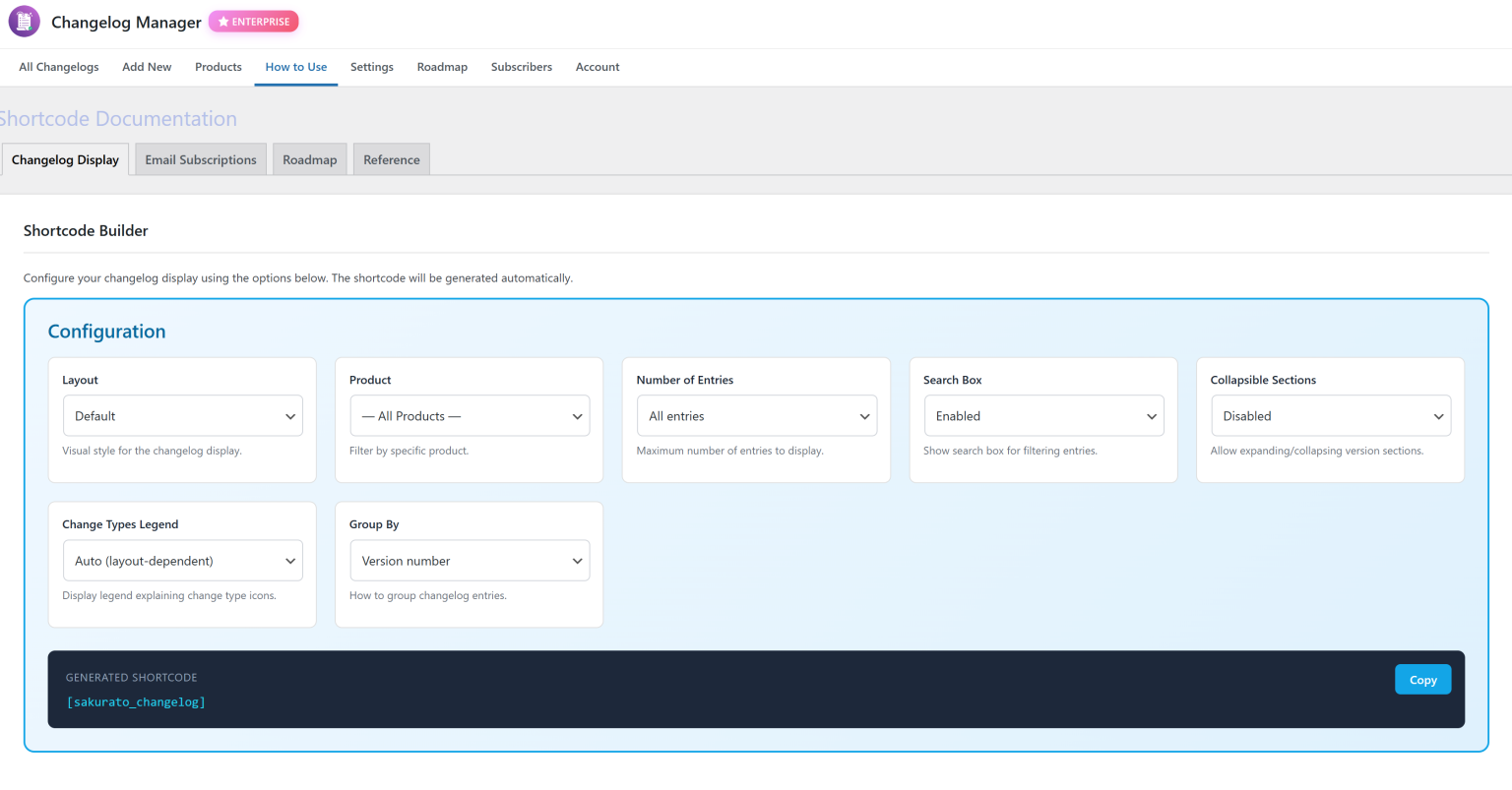
No coding required! The plugin includes an interactive shortcode builder that generates code for you. Just configure your options visually (layout, product filter, number of entries, etc.) and copy the generated shortcode. It's that simple!

Can I use multiple changelogs on one page ?

Yes! Use the 

v1.0.0 2025-12-23
➕ Added
Sakurato Changelog Plugin – Initial Release

Major Features:

  • ✅ Complete changelog management system for WordPress
  • ✅ Custom post type with version tracking and release dates
  • ✅ Product taxonomy for multi-product changelog management
  • ✅ 7 change type categories (Added, Changed, Improved, Fixed, Removed, Deprecated, Security)

Display & Layouts:

  • ✅ 6 professional display layouts: Default, Timeline, Compact, Detailed, Cards, Dark Mode
  • ✅ Responsive design - fully mobile-optimized
  • ✅ Client-side instant search functionality
  • ✅ Collapsible sections with expand/collapse controls
  • ✅ Customizable shortcode with 15+ parameters

Premium Features (Basic Pro):

  • 💎 5 premium layouts (Timeline, Compact, Detailed, Cards, Dark)
  • 💎 Unlimited products support
  • 💎 Advanced filtering options
  • 💎 Premium email support

Premium Features (Professional):

  • 🚀 Email notification system with double opt-in
  • 🚀 Subscriber management (instant, daily, weekly digests)
  • 🚀 AJAX-powered subscription forms
  • 🚀 Import/Export functionality (JSON, CSV, Markdown)
  • 🚀 Public roadmap with user voting system
  • 🚀 Roadmap Kanban board view
  • 🚀 Priority support

Premium Features (Enterprise):

  • 🏢 White Label branding (remove all Sakurato branding)
  • 🏢 Custom admin menu labels and icons
  • 🏢 Custom color schemes
  • 🏢 3 Gutenberg blocks (Changelog, Roadmap, Subscription)
  • 🏢 3 Classic widgets (Latest Changelog, Top Roadmap, Subscription)
  • 🏢 Analytics dashboard with view tracking
  • 🏢 CSV export for analytics data

Internationalization:

  • 🌍 Full translation support with .pot file
  • 🌍 5 languages included: English, Polish (pl_PL), Spanish (es_ES), German (de_DE), French (fr_FR)
  • 🌍 RTL language support ready

Integration:

  • ⚡ Freemius SDK for licensing and updates
  • ⚡ WordPress.org compliance (PHPCS, Plugin Check)
  • ⚡ Gutenberg block editor support
  • ⚡ Classic widget support
  • ⚡ Elementor compatibility
  • ⚡ WP-CLI compatibility ready

Developer Features:

  • 🔧 Clean, modular code structure
  • 🔧 Comprehensive inline documentation
  • 🔧 WordPress Coding Standards compliant
  • 🔧 Proper sanitization and escaping throughout
  • 🔧 Nonce verification for all forms
  • 🔧 Capability checks for security

Admin Interface:

  • 📊 Beautiful About page with system information
  • 📊 Interactive shortcode builder
  • 📊 Complete documentation with examples
  • 📊 Email settings configuration
  • 📊 Import/Export interface
  • 📊 Subscriber management dashboard
  • 📊 Roadmap item management
  • 📊 Analytics dashboard (Enterprise)

Performance:

  • ⚡ Optimized database queries
  • ⚡ Conditional asset loading
  • ⚡ Minification-ready CSS/JS
  • ⚡ No jQuery dependencies on frontend (pure JavaScript)
  • ⚡ Caching-friendly output

Security:

  • 🔒 Proper nonce verification
  • 🔒 Capability checks throughout
  • 🔒 Input sanitization and output escaping
  • 🔒 Prepared SQL statements
  • 🔒 GDPR-compliant (anonymized IP addresses)
  • 🔒 Double opt-in for email subscriptions

Known Limitations:

  • Free plan limited to 1 product
  • Email notifications require Professional plan or higher
  • Gutenberg blocks require Enterprise plan

Requirements:

  • WordPress 5.0 or higher
  • PHP 7.2 or higher
  • MySQL 5.6 or higher
  • Modern browser with JavaScript enabled

Credits:

  • Developed by Sakurato Team
  • Freemius SDK for licensing
  • Dashicons for admin icons
  • TailwindCSS-inspired utility classes for styling

For Users Upgrading from Beta/Development Versions:

If you were using a development version, please:

  1. Backup your database before updating
  2. Deactivate and reactivate the plugin after update
  3. Check all settings, especially email configuration
  4. Test subscription forms and notifications
  5. Verify that all shortcodes still work correctly
➕ Added
Quoto Pro Plugin – Initial Release

Initial Release - Professional Quote & Offer Generator

KEY FEATURES

📋 Quote Management Made Simple

  • Create unlimited professional business quotes and offers
  • Smart pricing calculator with automatic VAT calculations
  • Multi-currency support (EUR, USD, PLN, GBP....)
  • Custom offer numbering with your own prefix
  • Save drafts and publish when ready

🎨 Beautiful Professional Templates

  • 6 Premium Templates – Choose the style that matches your brand (Premium)
  • Fully responsive design for all devices
  • Print-ready PDF export with one click

👥 Client Experience

  • Secure Public Links – Share quotes with unique private links
  • Client Approval System – Clients can accept offers online
  • View Tracking – See when and how many times clients viewed your quote
  • No Login Required – Clients view offers instantly, no account needed
  • Professional Presentation – Clean, branded view without admin clutter

🖼️ Rich Content Options

  • Image Gallery – Showcase your products/services with photos
  • 4 Gallery Layouts – Grid, Masonry, and more (Premium)
  • Technical Descriptions – Multi-section product specifications
  • Offer Description – Professional introduction to your proposal
  • Payment Terms – Custom payment conditions
  • Delivery Timeline – Set clear expectations
  • Warranty Info – Build trust with guarantees
  • Custom Notes – Add terms & conditions

🏢 Company Branding

  • Upload your company logo (light & dark versions)
  • Complete company information management
  • Customizable contact details
  • Professional branded quotes that match your identity

🌍 Multi-Language Ready

  • 3 Languages Included: English, Polish, German
  • Easy translation to any language
  • Professional translations included
  • Perfect for international businesses

📊 Pricing & Products

  • Add unlimited products/services per quote
  • Quantity and unit price tracking
  • Automatic NET/GROSS calculations
  • VAT rate customization
  • Delivery and assembly costs
  • Professional price overview table

💼 Customer Management

  • Save customer information for future quotes
  • Quick customer data auto-fill
  • Contact details and address management
  • Build your customer database over time

🆓 FREE vs PREMIUM

FREE Features:

  • Up to 10 quotes total
  • Default professional template
  • Basic image gallery (Grid 2×2)
  • PDF export
  • Public sharing links
  • Client acceptance tracking
  • Multi-language support

PREMIUM Features:

  • Unlimited Quotes
  • 6 Premium Templates (Business, Elegant, Professional....)
  • Advanced Gallery Layouts (Masonry, Grid 3×3)
  • Priority Email Support
  • Lifetime Updates
Powered by Sakurato Changelog
 shortcode multiple times with different parameters. Each instance is independent, so you can show different products, layouts, or filters on the same page. Example: show a compact layout for Product A and timeline for Product B.

Does it work with page builders like Elementor ?

Absolutely! Sakurato Changelog works seamlessly with all major page builders: Elementor, Beaver Builder, Divi, Gutenberg, WPBakery, and more. Just paste the shortcode into an HTML/Shortcode widget. Enterprise users can use native Gutenberg blocks with live preview.

Are all layouts mobile friendly ?

Yes! All 6 layouts are fully responsive and optimized for mobile devices, tablets, and desktops. The layouts automatically adapt to screen size, ensuring your changelog looks perfect on every device.

More Questions ?

If you have more questions and need detailed instructions, please refer to the plugin documentation and faq.

Changelog & Release Notes

What's New in Sakurato Changelog

View the complete version history of Sakurato Changelog, the professional changelog management plugin for WordPress. Each release includes detailed notes about new features, improvements, bug fixes, and security updates. Our changelog follows Keep a Changelog format for maximum clarity and transparency. Stay updated with email notifications, premium layouts, roadmap voting, and more.

Newsletter Subscribe

Take the First Step to Better Task Management

Sign up today and unlock a powerful suite of tools designed to help you organize tasks

Join exclusive live sessions and learn from industry experts to level skills.
  • Special Discounts & Offers
  • Webinars & Workshops
  • User Spotlights